知知经验网
首页
美食营养
生活百科
知识问答
生活知识
返回
知知经验网
首页
美食营养
游戏数码
手工爱好
生活知识
生活百科
健康养生
运动户外
职场理财
情感交际
母婴教育
时尚美容
知识问答
更多知识
搜索
电脑钉钉怎么设置聊天分组
2026-04-27 12:38:49
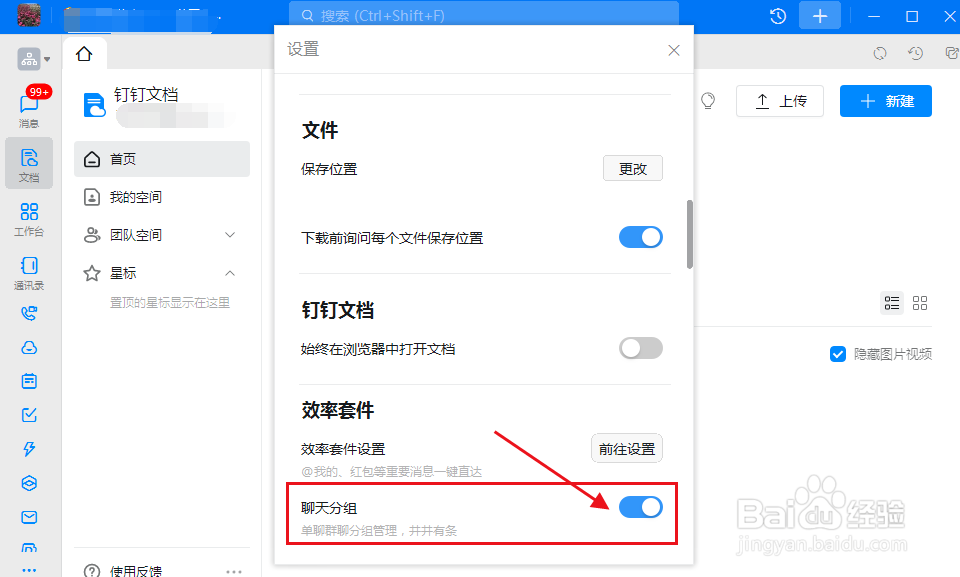
1、打开电脑钉钉点击左上角的头像。
2、点击设置。
3、在效率套件项,点开聊天分组按钮。
相关推荐
手机钉钉如何新建分组?
阅读量:184
钉钉分组管理如何设置
阅读量:159
钉钉群怎么设置群类别?
阅读量:156
钉钉群怎么设置分组,钉钉群怎么创建分组
阅读量:89
钉钉怎么设置单聊群聊分组管理,井井有条
阅读量:85
猜你喜欢
qq怎么发匿名消息
旅游概论
国庆节的手抄报怎么画
起水泡怎么处理
魔剑士怎么加点
浙江的旅游景点
赤峰旅游
河源桂山风景区
成都附近旅游景点
打电话英文怎么说
猜你喜欢
月经几天后可以同房
怎么才能消除黑眼圈
临沂旅游景点
大肚腩怎么减
安徽旅游职业学院
文昌湖旅游度假区
杭州宋城景区
阆中旅游
旅游的英文
国内旅游景点排行