如何设置RevoUninstaller启用快速加载模式
1、点击“RevoUninstaller”

2、在“RevoUninstaller”窗口中,点击“选项”
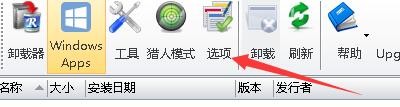
3、在“选项”窗口中,点击“卸载器”

4、在“卸载器”窗口中,勾选“启用快速加载模式”

5、点击“确定”即可

阅读量:142
阅读量:143
阅读量:181
阅读量:181
阅读量:169
1、点击“RevoUninstaller”
2、在“RevoUninstaller”窗口中,点击“选项”
3、在“选项”窗口中,点击“卸载器”
4、在“卸载器”窗口中,勾选“启用快速加载模式”
5、点击“确定”即可